How to install and Configure Rundeck?
Contents hide
System Requirements for Rundeck
Supported Operating Systems:
- Red Hat Enterprise Linux
- Oracle Linux
- CentOS
- Debian
- Ubuntu
- Windows Server
Amazon EC2
- Instance size of m3.medium or larger
- An instance size of m3.xlarge or larger if there are more than 100 hosts
Supported Database.
- Mysql version
- Mariadb version
- Postgres version
- Oracle version
Supported Log store
- File system
- S3 compatible object store
Others Important
- JAVA 8 or 11 Installed.
- 2 CPUs – 2 CPUs per instance
- 4 GB RAM – 4GB for the JVM instance
- 20 GB hard disk
Network access
- 4440 (http) & 4443 (https)
- Port 4440|4443 | netstat -an | egrep ‘4440|4443’
Install Rundeck Method
Docker
$ docker run --rm -it -p 4440:4440 rundeckpro/enterprise:4.0.1

or

$ docker info
$ docker ps
$ docker run --name rundeck-opensource -d -e RUNDECK_GRAILS_URL=http://3.111.53.239:4440 -e RUNDECK_SERVER_ADDRESS=0.0.0.0 -p 4440:4440 -v data:/home/rundeck/server/data rundeck/rundeck:4.0.1
$ docker ps -a
$ ls
# Access - http://3.111.53.239:4440/
with admin/admin
Installing on Ubuntu or Debian Linux distributions
| #----------------------------------------------------------- | |
| # Rundeck Enterprise: Installing on Ubuntu or Debian Linux distributions | |
| #----------------------------------------------------------- | |
| #----------------------------------------------------------- | |
| # Quick Install | |
| #----------------------------------------------------------- | |
| $ sudo apt-get install openjdk-11-jre-headless | |
| $ curl https://raw.githubusercontent.com/rundeck/packaging/main/scripts/deb-setup.sh 2> /dev/null | sudo bash -s rundeckpro | |
| $ sudo service rundeckd start | |
| $ sudo UFW disable | |
| #----------------------------------------------------------- | |
| # Manual Install | |
| #----------------------------------------------------------- | |
| $ sudo apt-get install openjdk-11-jre-headless | |
| $ curl -L https://packages.rundeck.com/pagerduty/rundeckpro/gpgkey | sudo apt-key add - | |
| $ deb https://packages.rundeck.com/pagerduty/rundeckpro/any/ any main | |
| $ deb-src https://packages.rundeck.com/pagerduty/rundeckpro/any/ any main | |
| $ sudo apt-get update | |
| $ sudo apt-get install rundeckpro-enterprise | |
| $ sudo service rundeckd start | |
| $ sudo UFW disable | |
| #----------------------------------------------------------- | |
| # Rundeck Community: Installing on Ubuntu or Debian Linux distributions | |
| #----------------------------------------------------------- | |
| #----------------------------------------------------------- | |
| # Quick Install | |
| #----------------------------------------------------------- | |
| $ sudo apt-get install openjdk-11-jre-headless | |
| $ curl https://raw.githubusercontent.com/rundeck/packaging/main/scripts/deb-setup.sh 2> /dev/null | sudo bash -s rundeck | |
| $ sudo service rundeckd start | |
| $ sudo UFW disable | |
| #----------------------------------------------------------- | |
| # vManual Install | |
| #----------------------------------------------------------- | |
| $ sudo apt-get install openjdk-11-jre-headless | |
| $ curl -L https://packages.rundeck.com/pagerduty/rundeck/gpgkey | sudo apt-key add - | |
| $ deb https://packages.rundeck.com/pagerduty/rundeck/any/ any main | |
| $ deb-src https://packages.rundeck.com/pagerduty/rundeck/any/ any main | |
| $ sudo apt-get update | |
| $ sudo apt-get install rundeck | |
| $ sudo service rundeckd start | |
| $ sudo UFW disable | |
| #----------------------------------------------------------- | |
| # Logging in for the first time | |
| #----------------------------------------------------------- | |
| # Navigate to http://localhost:4440/ (opens new window)in a browser. | |
| # Log in with the username admin and password admin |
Rundeck pro enterprise in Centos/Redhat
| # ==================================================== | |
| # Download Link | |
| # ==================================================== | |
| - RunDeck Community - https://www.rundeck.com/community-downloads | |
| - RunDeck Enterprise - https://www.rundeck.com/enterprise-downloads | |
| # ==================================================== | |
| # Rundeck pro enterprise Quick Install in Centos/Redhat | |
| # ==================================================== | |
| $ curl https://raw.githubusercontent.com/rundeck/packaging/main/scripts/rpm-setup.sh 2> /dev/null | sudo bash -s rundeckpro | |
| $ sudo yum install java rundeckpro-enterprise | |
| # ==================================================== | |
| # Rundeck pro enterprise Manual Install in Centos/Redhat | |
| # ==================================================== | |
| # Remove bintray-rundeckpro-rpm.repo if it exists. | |
| # Add the following entries to /etc/yum.repos.d/rundeck.repo replacing any existing entries: | |
| $ /etc/yum.repos.d/rundeck.repo | |
| [rundeckpro] | |
| name=rundeckpro | |
| baseurl=https://packages.rundeck.com/pagerduty/rundeck/rpm_any/rpm_any/$basearch | |
| repo_gpgcheck=1 | |
| gpgcheck=0 | |
| enabled=1 | |
| gpgkey=https://packages.rundeck.com/pagerduty/rundeck/gpgkey | |
| sslverify=1 | |
| sslcacert=/etc/pki/tls/certs/ca-bundle.crt | |
| metadata_expire=300 | |
| $ sudo yum install java rundeckpro-enterprise | |
| # When new versions of Rundeck Enterprise are released, you can upgrade to them using the command: | |
| $ sudo yum update rundeckpro-enterprise | |
| # ==================================================== | |
| # Rundeck pro enterprise Install rpm package directly in Centos/Redhat | |
| # ==================================================== | |
| $ sudo rpm -i rundeckpro-enterprise-4.0.1-20220404-1.noarch.rpm | |
| # ==================================================== | |
| # Start/Stop Rundeck in Centos/Redhat | |
| # ==================================================== | |
| # To start Rundeck: | |
| $ sudo service rundeckd start | |
| # To verify that the service started correctly, tail the logs: | |
| $ tail -f /var/log/rundeck/service.log | |
| # The service is ready once you see something similar to: | |
| Grails application running at http://localhost:4440 in environment: production | |
| # Logging in for the first time | |
| # Navigate to http://localhost:4440/ (opens new window)in a browser | |
| # Log in with the username admin and password admin |
How to access Rundeck using IP Address
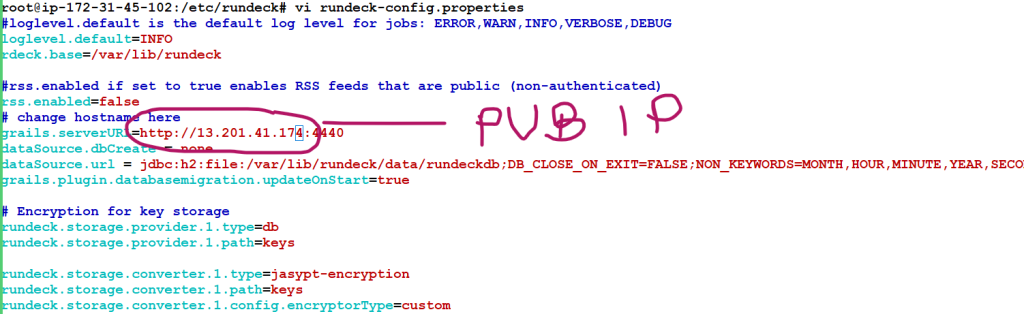
  28  vi rundeck-config.properties
   29  history
   30  sudo systemctl daemon-reload
   31  sudo service rundeckd restart
Configure Rundeck
/etc/rundeck/
/var/lib/rundeck/
OR
$RDECK_BASE/etc/
$RDECK_BASE/server/config/
DEB/RPM layout
/etc/rundeck/
├── admin.aclpolicy
├── apitoken.aclpolicy
├── artifact-repositories.yaml
├── framework.properties
├── jaas-loginmodule.conf
├── log4j.properties
├── profile
├── project.properties
├── realm.properties
├── rundeck-config.properties
├── rundeckpro-license.key
├── ssl
│   ├── ssl.properties
│   ├── keystore (not packaged)
│   └── truststore (not packaged)
├── system-job_reader.aclpolicy_template
├── system-job_runner.aclpolicy_template
├── system-job_viewer.aclpolicy_template
├── system-job_writer.aclpolicy_template
└── system-project_admin.aclpolicy_template

/var/lib/rundeck/
├── bootstrap
├── data
├── libext
├── logs
├── projects
├── repository
├── var
└── work
Launcher layout
$RDECK_BASE/etc/
├── admin.aclpolicy
├── apitoken.aclpolicy
├── framework.properties
├── preferences.properties
├── profile
├── profile.bat
└── project.properties

$RDECK_BASE/server/config/
├── artifact-repositories.yaml
├── jaas-loginmodule.conf
├── log4j.properties
├── realm.properties
├── rundeck-config.properties
└── ssl.properties
Tidak ada komentar:
Posting Komentar