Backing up and restoring RHEV with engine-backup
https://access.redhat.com/solutions/797463
Environment
- Red Hat Enterprise Virtualization (RHEV) 3.3 - 3.6
- Red Hat Virtualization (RHV) 4.0 - 4.3
Issue
- In RHEV 3.3 and later, the
backup.shandrestore.shscripts have been deprecated. What is the new method for backing up and restoring a RHEV Manager environment? - How do I move RHEV Manager to another server?
Resolution
IMPORTANT: The 'engine-backup' script will not take the backup of 'rhevm-report' in rhevm 3.3. If rhevm-report is installed then upgrade to rhevm 3.4 before using this script.
Preparation
Before backing up or restoring for the first time, postgresql must have the proper access permissions, allowing local network connections to use md5 authentication. By default, this file can be found here:
/var/lib/pgsql/data/pg_hba.conf
and should contain the following additional lines for proper engine-backup functionality:
host    <database>      <user>          0.0.0.0/0               md5
host    <database>      <user>          ::0/0                   md5
Backing Up
Backing up the RHEV Manager environment can be done while the ovirt-engine service is running. The only requirement is that the output directory exist prior to invoking the command. For example, here are the steps required to backup the RHEV Manager environment into the /var/lib/ovirt-engine-backups directory:
# mkdir /var/lib/ovirt-engine-backups/
# /usr/bin/engine-backup --mode=backup --scope=all --file="/var/lib/ovirt-engine-backups/engine-backup-$(date +%Y%m%d%H%M%S).tar.bz2" --log=/var/log/ovirt-engine-backups.log
Backing up...
Done.
The above will produce a bzip2 compressed tar file with a name like /var/lib/ovirt-engine-backups/engine-backup-20140422141808.tar.bz2.
Creating an automatic cron job
Create a simple script called
/usr/bin/backup.shwith the following contents:#!/bin/bash mkdir -p /backup /usr/bin/engine-backup --scope=all --mode=backup --log=/backup/backup.$(/bin/date +%Y%m%d%H%M%S).out --file=/backup/backup.$(/bin/date +%Y%m%d%H%M%S).tar.bz2Make
/usr/bin/backup.shexecutable:# chmod +x /usr/bin/backup.shAdd an entry to
/etc/crontab(The following example entry would cause theengine-backupscript to run every night at 3:30AM):30 3 * * * root /usr/bin/backup.sh >/dev/null 2>&1
Restoring
Restoring a RHEV Manager environment using engine-backup requires the following:
- A previously captured
engine-backupbackup file (see above for generating one of these) - An existing but empty
enginedatabase - If the restore will be into an already running RHEV Manager environment, ensure the
ovirt-engineandovirt-engine-dwhdservices are stopped
First, stop the
ovirt-engineandovirt-engine-dwhdservices:# service ovirt-engine stop # service ovirt-engine-dwhd stopNext, ensure the
enginedatabase exists and is empty:For RHEV3.4 and above:
# su postgres -c psql
postgres=#  DROP DATABASE engine;
postgres=# CREATE DATABASE engine OWNER engine template template0 encoding 'UTF8' lc_collate 'en_US.UTF-8' lc_ctype 'en_US.UTF-8';
postgres-# \q
For RHEV3.3 and earlier:
# psql -h localhost -U postgres -W
Password for user postgres:
postgres=#  DROP DATABASE engine;
postgres=# CREATE DATABASE engine OWNER engine template template0 encoding 'UTF8' lc_collate 'en_US.UTF-8' lc_ctype 'en_US.UTF-8';
postgres-# \q
Restore the RHEV Manager environment:
# /usr/bin/engine-backup --mode=restore --scope=all --file=/var/lib/ovirt-engine-backups/engine-backup-20140422141808.tar.bz2 --log=/var/log/ovirt-engine-backups.logOnce the DB restore is complete, the following message should be shown:
Restoring:
- Files
- Engine database 'engine'
- DWH database 'ovirt_engine_history'
- Reports database 'ovirt_engine_reports'
Rewriting /etc/ovirt-engine/engine.conf.d/10-setup-database.conf
Rewriting /etc/ovirt-engine-dwh/ovirt-engine-dwhd.conf.d/10-setup-database.conf
Rewriting /var/lib/ovirt-engine-reports/build-conf/master.properties
You should now run engine-setup.                                <======= [As mentioned here, you should run it after doing the DB restore.]
Done.
After DB restore is complete, run
engine-setupagain:# engine-setup- Finally, check and start the following services:
# service ovirt-engine start
# service ovirt-engine-dwhd start
# service httpd restart
How to backup and restore oVirt engine
Creating oVirt engine backups
Backup was taken in the oVirt server from command line, as shown here in our demo server. We backed up the engine database and configuration files into a single file that could be easily stored.
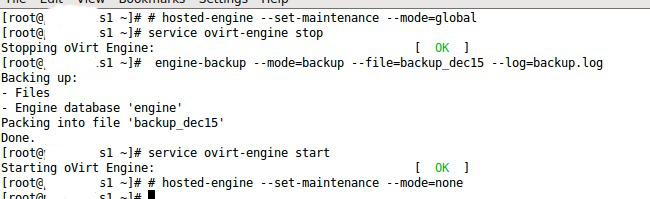
oVirt engine backup
The backup file was in a compressed format and could be restored easily in the future. It contained all the information to configure oVirt in case a restore was required.
RESTORE
The API script backed up these main configuration files and folders of oVirt:
'/etc/ovirt-engine/' directory that contained oVirt configuration files
'/etc/pki/ovirt-engine/' directory that contained the security files
'/var/lib/ovirt-engine/backups/' directory with the backup files
'/usr/share/ovirt-engine-reports/' directory with configuration files fore reports
'/var/log/ovirt-engine/setup/' directory for oVirt configuration settings and logs
'versionlock.list' file for versions of all oVirt cloud components
The database which contained the configuration settings, was also backed up by this script. The backups were then exported to our external backup server over secure channels on a daily basis.
[ Looking for the WHMCS plugin to manage your oVirt interface? Get our WHMCS plugin for oVirt management here. ]
Link to Red Hat Enterprise Virtualization 3.5 Administration Guide - Backups and Migrations.
Link to Red Hat Enterprise Virtualization 3.6 Administration Guide - Backups and Migrations.
Link to Red Hat Virtualization 4.0 Administration Guide - Backups and Migrations.
--------------------------------------------------------------------------------------
Chapter 13. Backups and Migration
13.1. Backing Up and Restoring the Red Hat Virtualization Manager
13.1.1. Backing up Red Hat Virtualization Manager - Overview
engine-backup tool to take regular backups of the Red Hat Virtualization Manager. The tool backs up the engine database and configuration files into a single file and can be run without interrupting the ovirt-engine service.13.1.2. Syntax for the engine-backup Command
engine-backup command works in one of two basic modes:# engine-backup --mode=backup
# engine-backup --mode=restore
engine-backup --help for a full list of parameters and their function.Basic Options
--mode- Specifies whether the command will perform a backup operation or a restore operation. Two options are available -
backup, andrestore. This is a required parameter. --file- Specifies the path and name of a file into which backups are to be taken in backup mode, and the path and name of a file from which to read backup data in restore mode. This is a required parameter in both backup mode and restore mode.
--log- Specifies the path and name of a file into which logs of the backup or restore operation are to be written. This parameter is required in both backup mode and restore mode.
--scope- Specifies the scope of the backup or restore operation. There are four options:
all, which backs up or restores all databases and configuration data;files, which backs up or restores only files on the system;db, which backs up or restores only the Manager database; anddwhdb, which backs up or restores only the Data Warehouse database. The default scope isall.The--scopeparameter can be specified multiple times in the sameengine-backupcommand.
Manager Database Options
engine-backup command in restore mode. The option syntax below applies to restoring the Manager database. The same options exist for restoring the Data Warehouse database. See engine-backup --help for the Data Warehouse option syntax.--provision-db- Creates a PostgreSQL database for the Manager database backup to be restored to. This is a required parameter when restoring a backup on a remote host or fresh installation that does not have a PostgreSQL database already configured.
--change-db-credentials- Allows you to specify alternate credentials for restoring the Manager database using credentials other than those stored in the backup itself. See
engine-backup --helpfor the additional parameters required by this parameter. --restore-permissionsor--no-restore-permissions- Restores (or does not restore) the permissions of database users. One of these parameters is required when restoring a backup.
Note
If a backup contains grants for extra database users, restoring the backup with the--restore-permissionsand--provision-db(or--provision-dwh-db) options will create the extra users with random passwords. You must change these passwords manually if the extra users require access to the restored system. See https://access.redhat.com/articles/2686731.
13.1.3. Creating a Backup with the engine-backup Command
engine-backup command while the Manager is active. Append one of the following options to --scope to specify which backup to perform:all: A full backup of all databases and configuration files on the Managerfiles: A backup of only the files on the systemdb: A backup of only the Manager databasedwhdb: A backup of only the Data Warehouse database
Important
all, must be accompanied by the files scope, or a filesystem backup.Procedure 13.1. Example Usage of the engine-backup Command
- Log on to the machine running the Red Hat Virtualization Manager.
- Create a backup:
Example 13.1. Creating a Full Backup
# engine-backup --scope=all --mode=backup --file=file_name --log=log_file_name
Example 13.2. Creating a Manager Database Backup
# engine-backup --scope=files --scope=db --mode=backup --file=file_name --log=log_file_name
Replace thedboption withdwhdbto back up the Data Warehouse database.Atarfile containing a backup is created using the path and file name provided.
tar files containing the backups can now be used to restore the environment.13.1.4. Restoring a Backup with the engine-backup Command
engine-backup command can be used to restore backups to fresh installations of Red Hat Virtualization, on top of existing installations of Red Hat Virtualization, and using local or remote databases.Important
version file located in the root directory of the unpacked files.13.1.5. Restoring a Backup to a Fresh Installation
engine-backup command can be used to restore a backup to a fresh installation of the Red Hat Virtualization Manager. The following procedure must be performed on a machine on which the base operating system has been installed and the required packages for the Red Hat Virtualization Manager have been installed, but the engine-setup command has not yet been run. This procedure assumes that the backup file or files can be accessed from the machine on which the backup is to be restored.Procedure 13.2. Restoring a Backup to a Fresh Installation
- Log on to the Manager machine. If you are restoring the engine database to a remote host, you will need to log on to and perform the relevant actions on that host. Likewise, if also restoring the Data Warehouse to a remote host, you will need to log on to and perform the relevant actions on that host.
- Restore a complete backup or a database-only backup.
- Restore a complete backup:
# engine-backup --mode=restore --file=file_name --log=log_file_name --provision-db --restore-permissions
If Data Warehouse is also being restored as part of the complete backup, provision the additional database:engine-backup --mode=restore --file=file_name --log=log_file_name --provision-db --provision-dwh-db --restore-permissions
- Restore a database-only backup by restoring the configuration files and database backup:
# engine-backup --mode=restore --scope=files --scope=db --file=file_name --log=log_file_name --provision-db --restore-permissions
The example above restores a backup of the Manager database.# engine-backup --mode=restore --scope=files --scope=dwhdb --file=file_name --log=log_file_name --provision-dwh-db --restore-permissions
The example above restores a backup of the Data Warehouse database.
If successful, the following output displays:You should now run engine-setup. Done.
- Run the following command and follow the prompts to configure the restored Manager:
# engine-setup

Tidak ada komentar:
Posting Komentar